
Enterprise Go SMS Pro Theme4 - Google Play
You'll be able to see results in few seconds.
Publisher Description
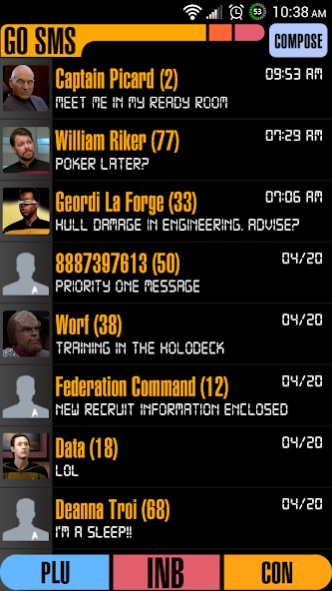


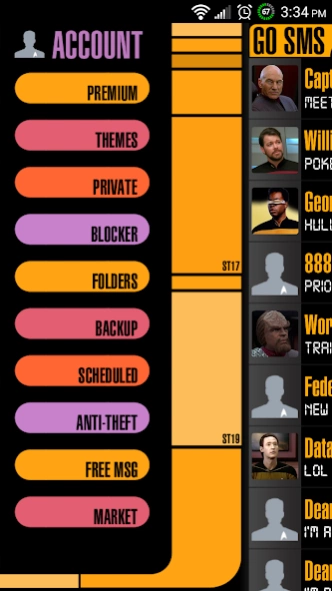
This is a futuristic, minimal, and colorful Go SMS Pro theme
This is a futuristic, minimal, and colorful Go SMS Pro theme based on computer interfaces from popular hit sci-fi shows.
Updated for better compatibility with Go SMS Pro 6.0+
*PLEASE READ THE INSTRUCTIONS AND FAQs*
*JELLY BEAN INFO FOR GO SMS PRO PRE V.6.0*
Font may not show up when scanned. Install ER Designs Fonts Pack and scan again.
**Fonts INCLUDED for use with GO SMS PRO PRE-6.0**
***This Go SMS Pro Theme only works with GO SMS Pro.
***Install GO SMS Pro free from the market first to use this Go SMS Theme.
FREQUENTLY ASKED QUESTIONS
--The font isn't showing up after I scan for font packages--
Install my font packages app, called ER Designs Fonts Pack.
--How do I apply the theme?--
Please do not open directly after it's installed as you would a normal application. Go to the GO SMS main screen (inbox): MENU > Theme. Make sure you have "Installed" selected, not "Featured". Choose and apply the theme.
Under Settings -> Application settings -> Running mode, make sure you have appearance customization enabled.
--How do I apply the included custom font(s)?--
The font will not apply itself automatically.
To apply fonts go to Appearance Settings (Menu -> Settings -> Appearance Settings) and press "Scan font packages" then apply in customization.
--Why doesn't the theme look right?--
Theme looks best with GO CHAT DISABLED.
Remember to set chat style to BUBBLE, in both Conversation customization and Conversation other settings (both are in Appearance Settings). You may need to uncheck and recheck them even if they are already selected.
--How do I disable Go Chat?--
Menu -> Settings -> Application Settings -> Running Mode and chose an option with GO Chat Disabled
--Why isn't the custom Pop Up showing?--
Make sure "Enable popup windows" is checked in Notification Settings under menu.
From the inbox, scroll left to the "Theme Store" icon and press it. Select "Go Popup" from the top menu, press the settings icon in the top right and select "Use the normal popup".
--What is this theme for?--
This theme only works for Go SMS Pro. It will not theme anything else on your phone.
Any other questions, concerns, suggestions, please email me directly at ryersondesigns@gmail.com
"er designs"
About Enterprise Go SMS Pro Theme
The company that develops Enterprise Go SMS Pro Theme is Ryerson Designs. The latest version released by its developer is 4.
To install Enterprise Go SMS Pro Theme on your Android device, just click the green Continue To App button above to start the installation process. The app is listed on our website since 2015-06-04 and was downloaded 0 times. We have already checked if the download link is safe, however for your own protection we recommend that you scan the downloaded app with your antivirus. Your antivirus may detect the Enterprise Go SMS Pro Theme as malware as malware if the download link to com.rd.gosms.theme.enterpriseblacktheme is broken.
How to install Enterprise Go SMS Pro Theme on your Android device:
- Click on the Continue To App button on our website. This will redirect you to Google Play.
- Once the Enterprise Go SMS Pro Theme is shown in the Google Play listing of your Android device, you can start its download and installation. Tap on the Install button located below the search bar and to the right of the app icon.
- A pop-up window with the permissions required by Enterprise Go SMS Pro Theme will be shown. Click on Accept to continue the process.
- Enterprise Go SMS Pro Theme will be downloaded onto your device, displaying a progress. Once the download completes, the installation will start and you'll get a notification after the installation is finished.
Program Details
System requirements
Download information
Pricing
Version History
version 4
posted on 2015-06-05
Disclaimer
Official Google Play Link
We do not host Enterprise Go SMS Pro Theme on our servers. We did not scan it for viruses, adware, spyware or other type of malware. This app is hosted by Google and passed their terms and conditions to be listed there. We recommend caution when installing it.
The Google Play link for Enterprise Go SMS Pro Theme is provided to you by apps112.com without any warranties, representations or guarantees of any kind, so access it at your own risk.
If you have questions regarding this particular app contact the publisher directly. For questions about the functionalities of apps112.com contact us.
